Essay record
Why I'm moving to a Linux-based, terminal-focused dev workflow - and what it looks like
- Record
- Essay / / 9 min read / 2,366 words
On this page4 sections / +
DISCLOSURE: Some links may be affiliate links. Details
I recently decided to move to a terminal-based workflow and here I'm going to share a bit about why I decided to make that choice and what my current setup looks like.
Why Linux?
TL;DR - Windows is crufty and I don't like Apple's walled-garden approach.
I switched off Windows last year for Fedora because I was sick and tired of all the ads in the bottom right corner and my computer shutting itself down every couple of days, leading to loss of all my app windows. Plus I was running into some compatibility issues - trying to build some simple games with Raylib but running into issues with WSL (Windows Subsystem for Linux) and graphics and was just kinda like why am I fighting this thing so much?
I will note Windows has some nice things like best in class gaming and driver support and also has the largest array of available commercial software but for a lot of what I do, that's just not a big deal.
While I think Apple devices are nice (I've used Macbooks at work for the last ~7 years), I personally think they're overpriced and the walled garden is generally bad for tech innovation. That said I do understand it can lead to some benefits in terms of privacy and stability but think many of those claims are overblown if you use basic security / privacy / stability approaches to software. I also understand most phone / computer users don't so having a high floor of these fundamentals can protect a bunch of people from bad actors online. So Apple has its place and is very useful for a lot of people but I personally don't see that much benefit myself.
So I've been a PC guy by choice for the past ~decade and have run Linux flavors for about 6 of those 10 years and now I'm back to Linux, this time with Fedora.
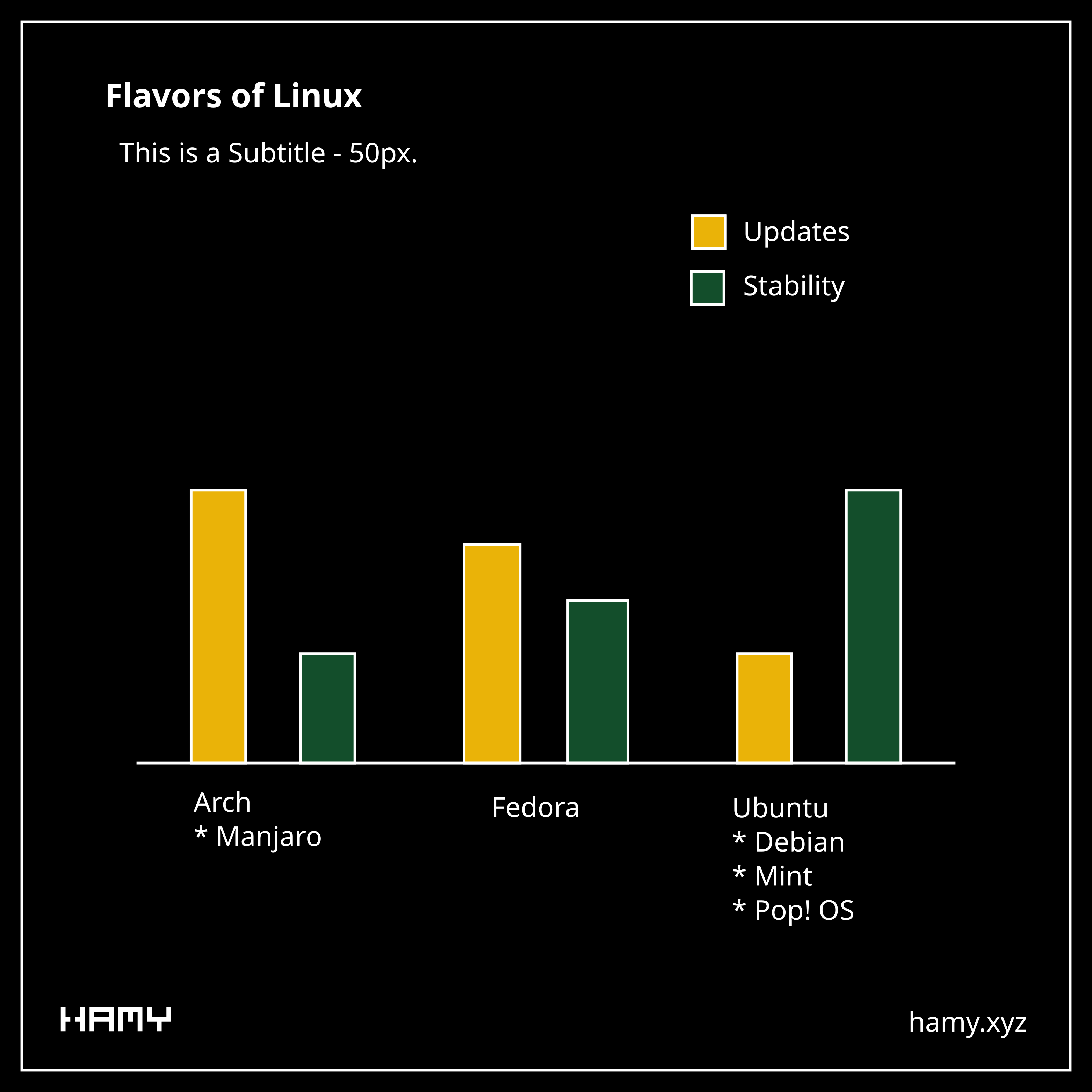
I chose Fedora because I felt it had a nice balance of frequent updates and stability. It gets more frequent updates than Ubuntu/Debian and updates are more tested than they are for Arch. Plus it has good backing in terms of a corporate backer and large user base so there's money and people incentive to keep developing for the ecosystem and most popular packages do ship a Fedora-compatible version.
And 12 months later I'm pretty happy with my choice. Fedora has been remarkably stable for me and is perfectly happy to be left running for days / weeks at a time before restarts or installs which suits some of my long-running AI workloads well. Also games work great - I've got an Nvidia GPU and run my games through Steam, sometimes with its Proton compatibility layer. If Protondb says the game is good to go then it usually works fine out of the box.
Why a terminal-focused workflow?
So I've worked as a professional software engineer for close to a decade and played with computer for much longer than that. I've seen people who worked all in terminals and thought that was cool but never really felt it was that useful / necessary - apps and GUIs are good!
Terminals have a lot of drawbacks:
- Apps are easier to navigate visually
- Terminals require a lot of memorization to navigate - hot keys for everything
- Web continues to explode and has great visuals and runs everywhere, so there's no shortage of nice looking UIs / apps for almost any purpose
But some recent developments have started to shift my thinking on this:
- AI CLIs are mainstream - very good general purpose helpers that live right in my terminal and are text / file native. I can talk to them about whatever and get responses with context of my machine.
- Managing multiple AI CLIs at once can be cumbersome - My approach was to just have a vscode up per project and then tab through them to get to the project gui and look at the terminal. But that started to get more cumbersome when I went from 2 projects to 5 and then each one of those might have multiple AI agents in the terminal (eg if I'm running a long-running orchestrator like Phase Golem) plus there might be a more general agent in a terminal outside of VS Code doing smth else. I started spending more time context switching and searching my tabs / windows for the right chat.
- I noticed that existing multi-agent managers are kinda clunky and many of them are not built for Linux or at least not for my flavor of Linux. Some run in terminals as TUIs, some come built in like Anthropic's Cowork and whatever ChatGPTs version is, many that run in vscode only handle a single chat at a time or are personal projects with low stability. So people are thinking about this but none of them seemed very compelling vs my existing tab-based approach.
- I've got time to experiment with new approaches. I'm doing a 12-week programming retreat at Recurse Center all about exploration and experimentation. So if there was ever a time to refactor my entire workflow, it's now.
- AI CLIs unlock talking to your computer. One of the biggest risks of moving distros / workflows is there's so much you need to replace to get back everything you'd built up in previous workflows. But AI supercharges this because now you can ask it about colors and hotkeys and functionality and it can give you fast answers and even fix configs on your machine to get things just as you want whereas previously you'd have to make some arcane searches and comb through 5y old threads to chase down your specific problem and hope the listed answer actually worked. If there was ever a time to overhaul your full setup and do so without much risk of bricking everything, now's the time. Year of the Linux desktop amirite?
What I wanted out of a new workflow:
- A way to navigate my system mostly with keyboard for most operations - a lot of what I'm doing is flipping back and forth between chats and terminal shells so if I can do it w keyboard then can save some context switching there
- A way to keep track of my windows and organize them so that not only am I switching them quickly, but it's easy to keep track of where everything is and what I'm switching to
- Ways to manage my terminal sessions better - I'm working with several agents across projects and some projects with multiple agents so a way to organize these better, beyond just terminal windows would be useful
- A setup that is highly portable across machines. I run two computers daily (laptop and desktop) and also typically have a 3rd at work so I'd like most of what I setup to be useful across all my workstations so I can minimize context switching and benefit from all the work I've put in to optimize my setup.
- Something quick and light - I am moving SO fast that I want to streamline my processes to keep up. That likely means more keyboard, less mouse, and more automation. These tend to benefit from simpler programs not heavier GUIs, as the rise of AI CLIs can attest.
So all this kinda led me to considering terminals again since that's right where my AI CLIs were already running. Building Phase Golem (my AI orchestrator) further cemented this point as I was impressed with how easy it was to build useful wrappers around these CLIs and that worked all on local files and a bit of code. I was also intrigued based on seeing other Recurser's setups and thought it'd be cool to give them a try and see how they work if nothing else.
My Current Linux-based, terminal-focused setup
Here we'll discuss my current Linux-based, terminal-focused setup.
Note that this is my current setup at time of writing. I've only been back to Linux for a year and only started researching and implementing this setup last week so there's likely going to be some decisions based on partial data / context that will change in the coming months. But I still felt it was useful to share in case anyone else was curious about this route.
- Operating System: Fedora - Fedora is a solid Linux Distro. More stable than Arch, faster updates than Ubuntu/Debian. I ran KDE Plasma for about a year with basically no problems before deciding to seek out more keyboard-focused flows.
- Desktop Environment: For those that don't know, Linux can run different desktop environments which basically is a way to access your computer / files with a graphical interface - so it kinda lets you customize whether your computer acts more like a Windows machine or a Mac machine or smth else entirely. Ran KDE Plasma which is probably the closest to a Windows-like experience, I preferred the feel over Gnome which just feels like it's built for an iPad. I'm now running Sway which is basically a simpler and more stable version of hyprland - these run on a different philosophy than Mac/Windows/most other DEs in that they don't do floating windows, every window is tiled and visible and therefore easy to hotkey to without cycling through tabs. They do this with the idea of workspaces (aka virtual desktops) as first class citizens and then windows can be tiled within them. So everything is just a few key presses away which accomplished a lot of what I was looking for.
- Terminal: Ghostty - it's modern, it's well supported by hashicorp, it's open source. So I have high hopes this will continue to be maintained for years to come. I also switched my shell to zsh under the hood and honestly bash feels like a legacy tool in comparison.
- Terminal sessions: The idea of sessions is smth I've heard of but never really felt the need / saw the use for. But now I'm like whoa this is sick. Basically it can remember where you were in your terminal so you don't lose old logs or AI chats that were open but this is just scratching the surface. Inside of each one you can also have tabs and panes which basically allows you to tile terminal sessions WITHIN the one terminal window. I've been loving this because it now lets me have a single workspace for a given project and I can have all my related terminal sessions in the same window, customizable with panes and tabs. Plus there's an easy switch so if I have an open terminal, I can easily jump back to a terminal in another project by name. I chose Zellij over tmux for this as I found it much more intuitive and also looks much nicer.
- Editor: I figured since I'm going terminal-first I might as well try out neovim. It's taking some time to learn as I have to learn both vim and all of its editor-specific motions but I'm making progress and am hopeful in a couple weeks I'll be up to speed with it. Vim has honestly been the easier of the two as the basic motions like juse h,j,k,l as arrow keys are pretty intuitive and I've since moved my Obsidian notes to use Vim and Chrome to use vim-like controls via Vimium. (vimtutor was a great introduction if you're curious about learning).
- Notes: I'm back to Obsidian because it works on my local files. It's been really helpful for building local commands for my AIs like reading the last week of notes and summarizing them or looking at my goals and giving me feedback on my plans. These are all things that other AIs can do if they're built into the note taking platform, but by moving my notes local I now have WAY more control of what they can do, what they can see, and which AI / models I use for this. Plus I can always add to their functionality cause it's all just files, code, and context so if I ever see a lapse or an opportunity I can fix it.
So my current setup right now is:
- Workspace 1 - Terminal window with general AI chat(s) open. AIs are so good that you can just point them to things and talk across projects about stuff. This is replacing my typical Claude in Chrome window.
- Workspace 2 - Web browser
- Workspace 3 - Notes with Obsidian and an AI terminal
- Workspace 4+ - Adhoc windows for specific projects or if I have dual monitors etc
Note that these are all flexible, like sometimes I want an editor or browser or terminal open in the various workspaces so may spin one up to do a specific task but typically these stay regardless of what I'm working on.
Next
So yeah that's my current Linux setup. I'm still getting used to everything but it already feels a lot lighter and more streamlined for managing my windows, workspaces, and various projects so I'm pretty excited about it. Neovim itself will take some getting used to as I switch over from my years of muscle memory with VS Code and I'm not entirely sure how it's going to work with my work stuff so not totally sold on it but will give it a try as I think it's the best current option for a terminal-native editor.
If you're keeping count, this is now the second big undertaking I didn't think I'd be doing during my Recurse Center batch after switching to Rust but here we are and I've gotta say I'm pretty stoked about it.
If you liked this post you might also like: