Essay record
5 AI Coding Best Practices from a Google AI Director (That Actually Work)
- Record
- Essay / / 7 min read / 1,814 words
On this page6 sections / +
DISCLOSURE: Some links may be affiliate links. Details
Addy Osmani, a director on Google's Gemini team, recently shared his AI coding workflow for 2026. I've been using AI to code daily for the past year and have found many of these principles useful in practice.
In this post I'll distill these into 5 key practices I find useful, add my own takes, and share what's worked for me - including a spec-driven workflow I've developed that helps keep AI on track across multiple sessions.
Plan Before You Code with Spec-Driven Development
Osmani's first principle: create a spec before writing any code. He calls it "waterfall in 15 minutes" - rapid structured planning that prevents wasted cycles. The spec includes requirements, architecture decisions, and testing strategy - but crucially no direct implementation details.
This matches my Vibe Engineering philosophy of being heavily involved in setting direction. The separation between spec and plan matters because AI is bad at maintaining long-term vision - its context window gets polluted while working on individual tasks and future sessions won't have previous context.
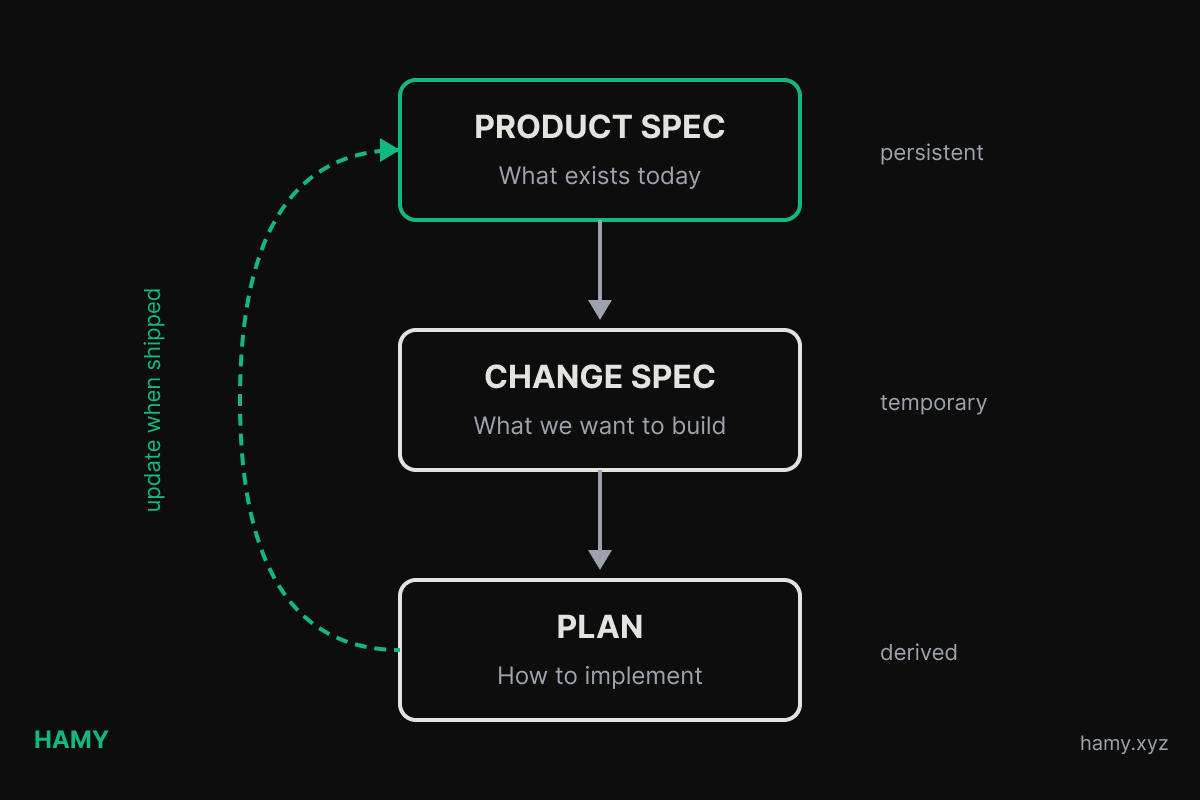
The solution is a spec hierarchy that anchors the AI across sessions:
FEATURE/
  FEATURE_SPEC.md # Long-lived, describes full product / feature

AGENTS/ # Or wherever you want to keep your plans
  changes/
    IDENTIFER_NAME/ # Unique identifier w human readable name for the change
      SPEC.md # Spec you create describing the change
      PLAN.md # The plan for how to implement + progress tracking
- Product-level spec describes what the product does today. It gets updated when features ship. Every AI session starts by reading this so it knows the full context of what the end product is supposed to do so it doesn't accidentally break something. Small projects may only need one of these at project root but larger projects will often have one for each slice and feature of sufficient size - kind of like a README but for the actual product requirements.
- Change-level spec describes the outcome of a specific change. What should happen, not how. This forces you to articulate what success looks like before you write any code. Plus it can be reused to provide context as you iterate on the plan and implementation.
- Change-level plan is the plan the AI will follow to actually implement the change. Useful to be broken down into phases with each phase being one logical change that leaves the codebase in a working state (think atomic commits). Each phase should include relevant context for what it's trying to accomplish, checklists for what to change and tracking progress between sessions, and verification steps.
The workflow:
- Write change spec describing the desired outcome
- AI creates a plan based on both the product and change specs
- Break plan into discrete phases and individual tasks
- Iterate on each phase / task one by one - review and verify at each stage to improve the code and course correct. I often find it useful to have a new session for each task so that it conserves its context and doesn't get confused with info from a different task.
- When done, update product spec with the new reality
- Move to the next change
This prevents the common failure mode where AI "helpfully" changes something that breaks an existing feature because it didn't know that feature existed / what it was supposed to do.
Doing the spec early may seem like it wastes time but it allows you to iterate with AI in the tightest possible loop - getting aligned on the outcome we want without noise from how we'll implement. Then you keep reusing the spec in each of your prompts for planning and task implementation which improves AI's ability to one-shot cause it has all the context it needs to stay on track.
Work in Small Chunks
Osmani recommends breaking work into focused tasks, committing after each one - treating commits as "save points" you can roll back to.
I wrote about this in How to Checkpoint Code Projects with AI Agents. The workflow:
- Give AI one atomic task
- Review the code (and have AI review in parallel - you'll catch different things)
- Commit if it looks good
- Move to the next task
This works because AI performs better on focused tasks than "build me this whole feature." You stay in the loop as the code grows instead of getting handed a 500-line blob you don't understand. And when something inevitably breaks / AI goes off the rails, rollback is easy - just revert to the last solid state without losing too much unsaved work.
Note that this idea also works great for human coders and often provides higher dev velocity over time - it's the basis of atomic / stacked commits.
Use the time you've saved with AI and this workflow to improve the code - review more carefully, add tests / verifications you may have skipped, and do one more refactor. The AI velocity speed up is real but it only compounds if you uphold quality.
Give AI the Right Context
"LLMs are only as good as the context you provide," Osmani writes. He recommends creating agent files (CLAUDE.md, GEMINI.md, etc) with coding style guidelines and architectural preferences that prime the model before it writes any code.
For small projects, I typically just use an agents file with all my rules in there. But as projects grow, I break documentation out into independent docs located near the logic in question so AIs can choose when loading it into context is worthwhile.
When writing a prompt - I use spec driven development for large features but may just adhoc it for smaller features. In both cases I include context that I'd expect a new engineer to need to know to complete the task:
- How the codebase is structured (link to existing docs)
- How the relevant product should function (link to product and change spec)
- Patterns to use and avoid
- How to verify the changes
- Coding style preferences
The more specific you are, the less back-and-forth there is fixing style issues or filling in missing context..
Automate Your Safety Net
Osmani emphasizes that "those who get the most out of coding agents tend to be those with strong testing practices." At AI speed, you need more guardrails, not fewer - when you're generating code 10x faster, you're also generating bugs 10x faster.
Some methods I've found helpful:
- Types catch misalignments at compile time. AI sometimes uses the wrong type or misunderstands an interface - the type checker catches it before you even run the code which allows it to self-correct and achieve more one or few shots. Type-first development is also a useful way to iterate on really huge systems that may not fit into an AI's context window - lay out the types first then move to implementing the features one at a time within those interfaces. Related: Types vs No Types - How Types Allow Code to Scale across Developers, Organizations, and Lines of Code.
- Linters enforce patterns automatically. If you have rules about code style, import order, or banned patterns, the linter will flag violations AI doesn't know about.
- Tests tell AI when it broke something. This is the big one - AI assumes success unless told otherwise. A failing test suite gives it immediate feedback to self-correct. Coupling tests with specs also helps prevent AIs from just changing / deleting the tests to pass - they should (hopefully) understand what the product requirements are and avoid breaking them.
- CI/CD catches things before they merge. Even if AI convinced you the code looks good, the automated pipeline is the final check. This is also a great place to have smoke tests that may not be feasible to run locally as a final safety net. This is especially useful for cloud-based AI workflows that are async by design - without automated checks, it's very easy to let bad AI code that looks okay into prod.
Let machines do what they're good at - running fast and deterministically. Every guardrail we add allows AIs to see discrepancies earlier in the dev cycle, so they can fix without blocking on a human - ultimately increasing E2E feature velocity.
You are the Driver
Osmani's core philosophy: "AI-augmented software engineering, not AI-automated. The human engineer remains the director."
You're responsible for what ships. Every bug, every security hole, every poor UX decision - it's got your name on it. AI wrote the code, but you approved it.
Beyond code quality, you own the product vision. What should we build? What's the user experience? What are we optimizing for? AI can implement features, but it can't tell you which features matter. You own the system design too - the architecture, how pieces fit together, what tradeoffs to make. These are judgment calls that require understanding the full context of your users, your business, and your constraints.
This is where humans remain valuable even as AI gets better at implementation. AI can write code faster than you. It might even write better code for well-defined tasks. But deciding what to build, how it should feel, and how the system should evolve - that's still you.
As I wrote in vibe engineering over vibe coding, if you can't evaluate what AI produces, you can't improve it. You're just hoping it works. And if you're just hoping it works, then AI might as well replace you.
The bright side is that AI amplifies your abilities. The more you know about design, testing, and architecture the more AI can help you build faster while maintaining quality. Plus it can help you learn new things - you just have to acknowledge you don't know something and ask AI to help you understand it. AI is a force multiplier, but you still need to be driving to get the most out of it.
Next
Osmani's principles largely align with the AI engineering practices I've found useful this past year.
If you're getting started:
- Create a CLAUDE.md (or equivalent) with your coding style and project structure
- Review and commit after every logical change (atomic commits!)
- Write specs before you code - both product-level and change-level
- Set up automated checks (tests, linters, types) - use AI to help you do this!
AI makes you faster but it doesn't replace engineering judgment. Use the speedup to write better code, not just more code.
If you liked this post you might also like: