Essay record
Vibe Coding a Stats Page for my Website - Here's what I learned
- Record
- Essay / / 2 min read / 704 words
On this page6 sections / +
DISCLOSURE: Some links may be affiliate links. Details
Over the break I built a stats page for my website. I primarily vibe coded it.
Here we'll discuss what it is, why I built it, and learnings from vibe coding.
What's on the stats page?
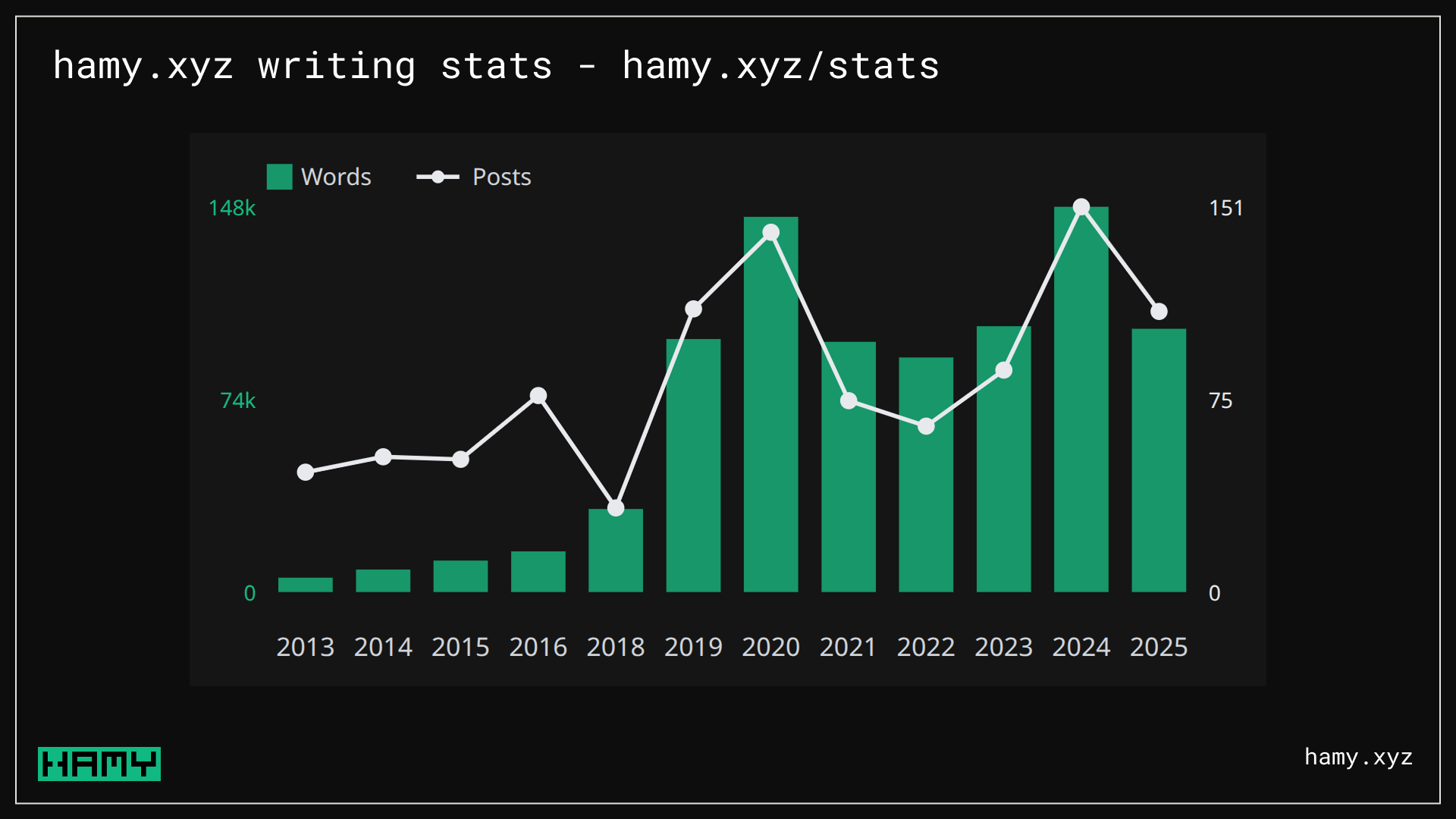
The stats page contains several stats ab items on my site:
- Total posts, broken down by type
- Total words
- Stats by year
- Project stats
Why build a stats page?
I write periodic reflections on my life which often include statistics. Historically I've manually gathered these stats from various sources.
I recently came across some cool stats pages on people's blogs and decided it would be a good thing to build for me as well.
- Good Blogging Habits Yield a Book Each Year
- Simon Dann stats page
- Tim Harek stats page
- Jim Nielsen stats page
Vibe coding my stats page
Okay I say vibe coding but generally I am more vibe engineering the page. I'm letting AI do most of the implementation but I'm heavily involved in the planning and tradeoff discussions.
You can read more about my approach to building with AI in:
- Stop Vibe Coding, Start Power Coding - How To Write Quality Software Faster With Agentic AI
- How I Actually Code with AI as a Senior Software Engineer
The stats page was a good candidate for AI coding because:
- It's a leaf node, not a tree node. This is an end feature and not a core piece of infrastructure other parts of the system will rely on. Data repos already exist for fetching the underlying entities. These are excellent candidates for AI coding as it can go wild and it's okay if bits of it are bespoke or slightly off - it won't impact future development that much.
- I have limited time to devote to it. I'm on vacation and have limited time / energy to devote to this as I'm building it in a 30 minute window I have while the baby is asleep and before I meet up with family. AI can code very fast and this feature requires a bit of boilerplate for rendering so this is a good candidate to allow AI to speed up the implementation phase.
All in all, it took about 25 minutes to get the core stats page up. I've since added a few more things to it but this would've easily taken a couple hours to build if I typed it out myself, especially if I included test coverage and stuff.
Stats page technical details
The stats page is basically just a static list of data and a chart so nothing crazy requiring external dependencies. As such I decided to build everything with tools I already had:
- UI: SSR HTML built with C# and CinderBlockHtml, Tailwind and DaisyUI for styles
- Calculations: Calculate at startup, hold in immutable record, and render on page hit
One interesting design choice was to build the chart as an svg manually. This is typically not something I would roll myself as it's a bit tedious but with AI it takes just a couple minutes of prompting to get right. I think this is a great example of the kind of bespoke, custom software AI unlocks. It's maybe not something I'd use in production at scale but is a great option for these "leaf node" scenarios - no new dependencies to manage, just build it myself.
Cool learnings from my stats page
- Writing ~100k words a year for the past few years
- 12 years of writing and counting
- My blog posts started getting very wordy around 2018, moving from a couple hundred words per post to ~1000
Next
Checkout my stats page if you haven't already and lmk if you have suggestions for things to improve.
If you liked this post you might also like: