Essay record
AI Dotfiles - How I Take My AI Workflows Across Projects And Machines
- Record
- Essay / / 4 min read / 1,226 words
On this page7 sections / +
DISCLOSURE: Some links may be affiliate links. Details
Over the past 6 months I've transitioned my entire dev workflow over to agentic engineering.
I now have a set of tools I use for coding with AI for both work and personal engagements - across machines and repos. (This tool set also covers other common workflows like writing, planning, and brainstorming).
I've gotten a few questions about how I make my AI skills / tools portable across machines, how I work across repos, and how I build/maintain my own skills so wanted to discuss the idea of AI dotfiles here.
Dotfiles port system settings
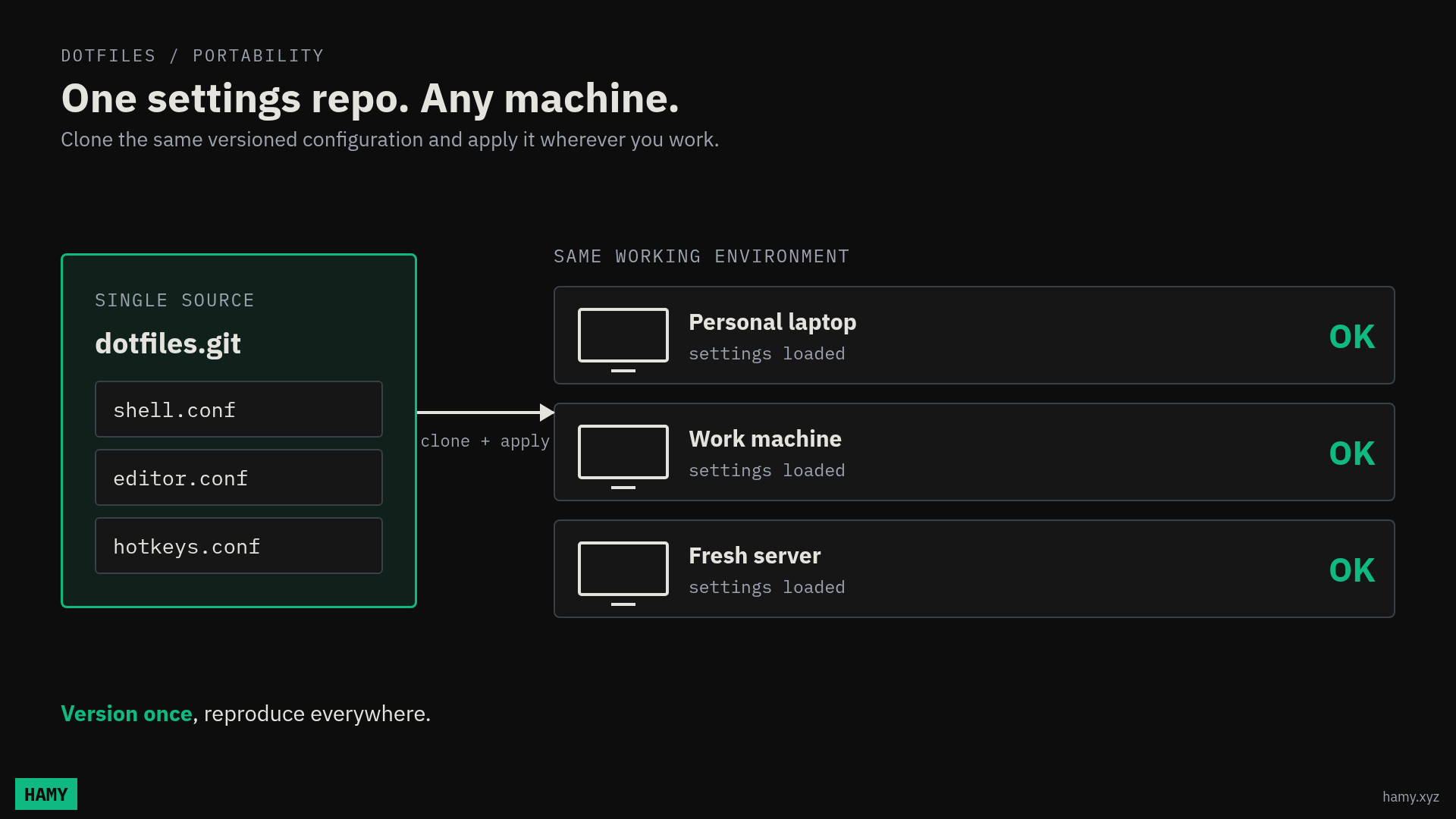
We've had a way to bring your computer settings with you across machines for a long time in the form of dotfiles - a repo of your preferred settings that you load onto your machine to configure it with code (IaC for your machine just like you would a server).
- Git repo holds your settings
- Log into machine, pull down repo
- Apply it to your machine
- Now machine is configured how you want
This is useful because you can easily make ~any machine act like you expect - your preferred programs, hotkeys, styles, settings, etc.
AI dotfiles are similar but for AI workflows.
AI dotfiles port AI workflows
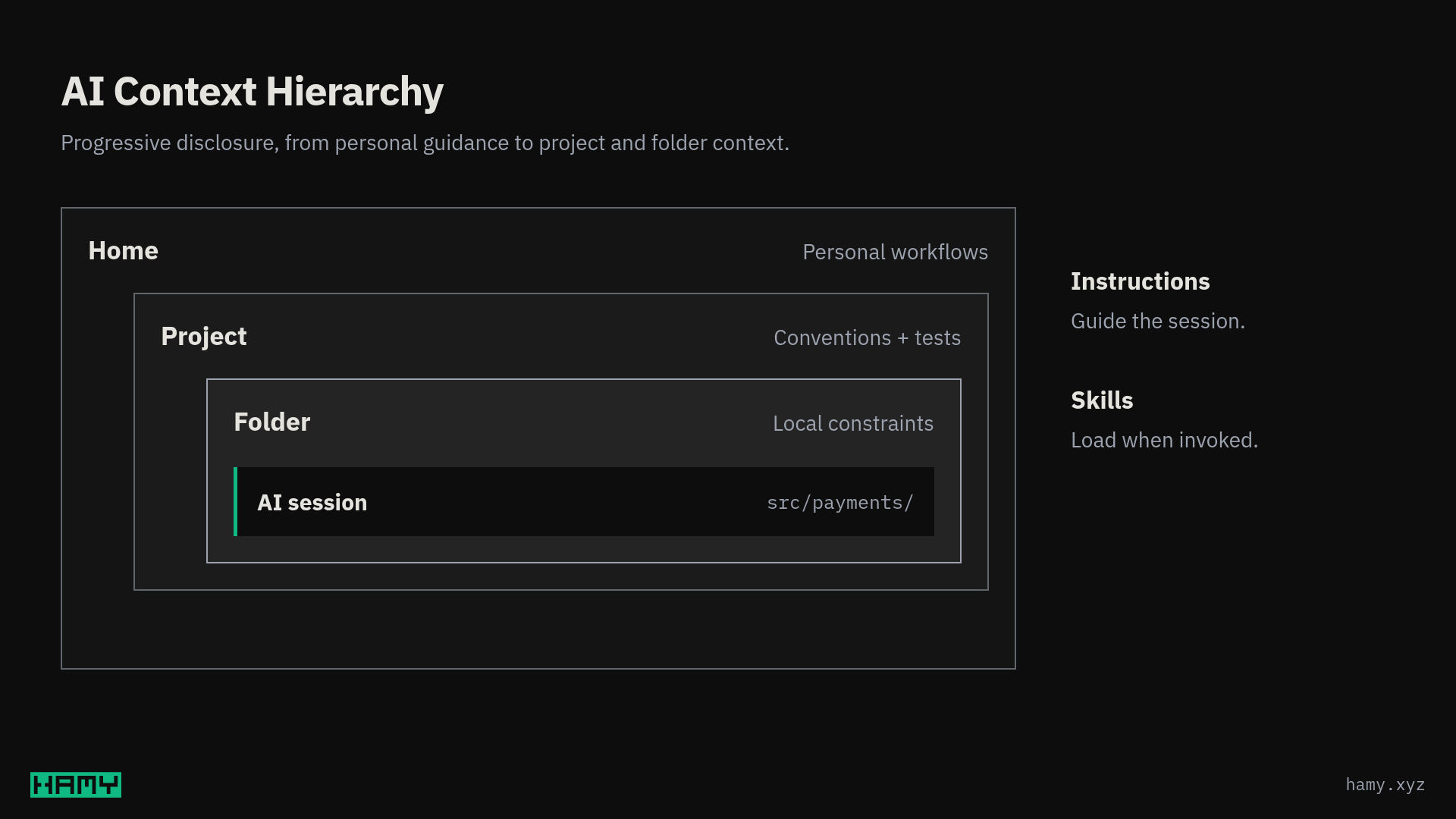
Most major harnesses allow for hierarchical skill resolution.
This means you can have skills in:
- Home (~/)
- Project repo
- Project folder(s)
All of them will be loaded when working in a location that falls within these (granted these things are nondeterministic so YMMV).
This means that you can build your AI dotfiles repo, load them into your home directory, and use them anywhere on any machine just like you would with your regular dotfiles. This is how I use my AI workflows across my personal AND work machines so I always have my preferred workflows at hand.
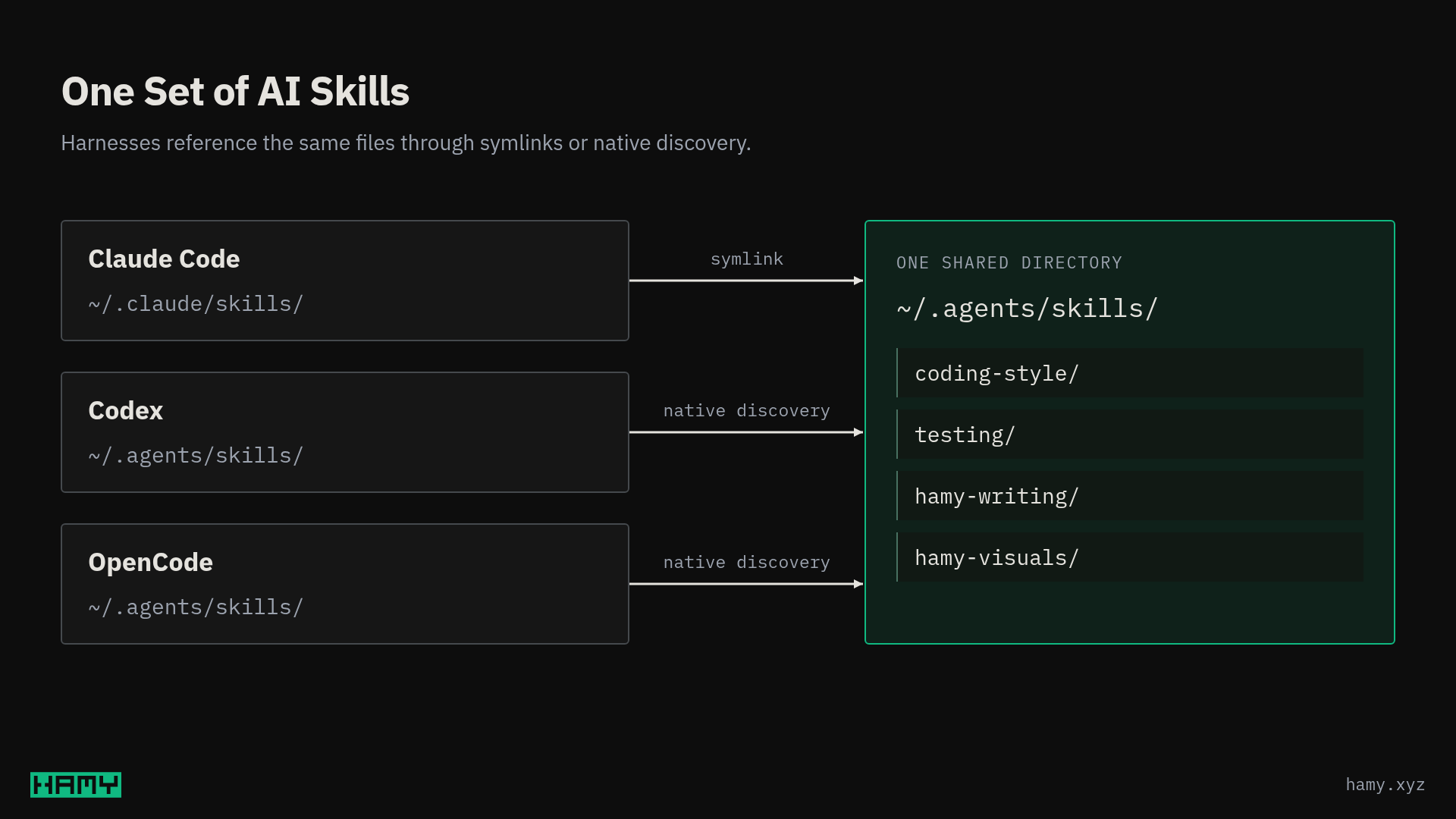
Some harnesses do have their own quirks about what skills / files they load but you can usually work around that with some targeted prompting and default symlinks.
My current setup for harness-agnostic AI skills:
- All skills in
.agents/andagents.md - Harness-specific entries (like
CLAUDE.mdand.claude/skills) symlink into my agents version
This allows me to create ~one source of truth for my AI workflows and have everything else just be a reference to them.
Hierarchies of AI workflows
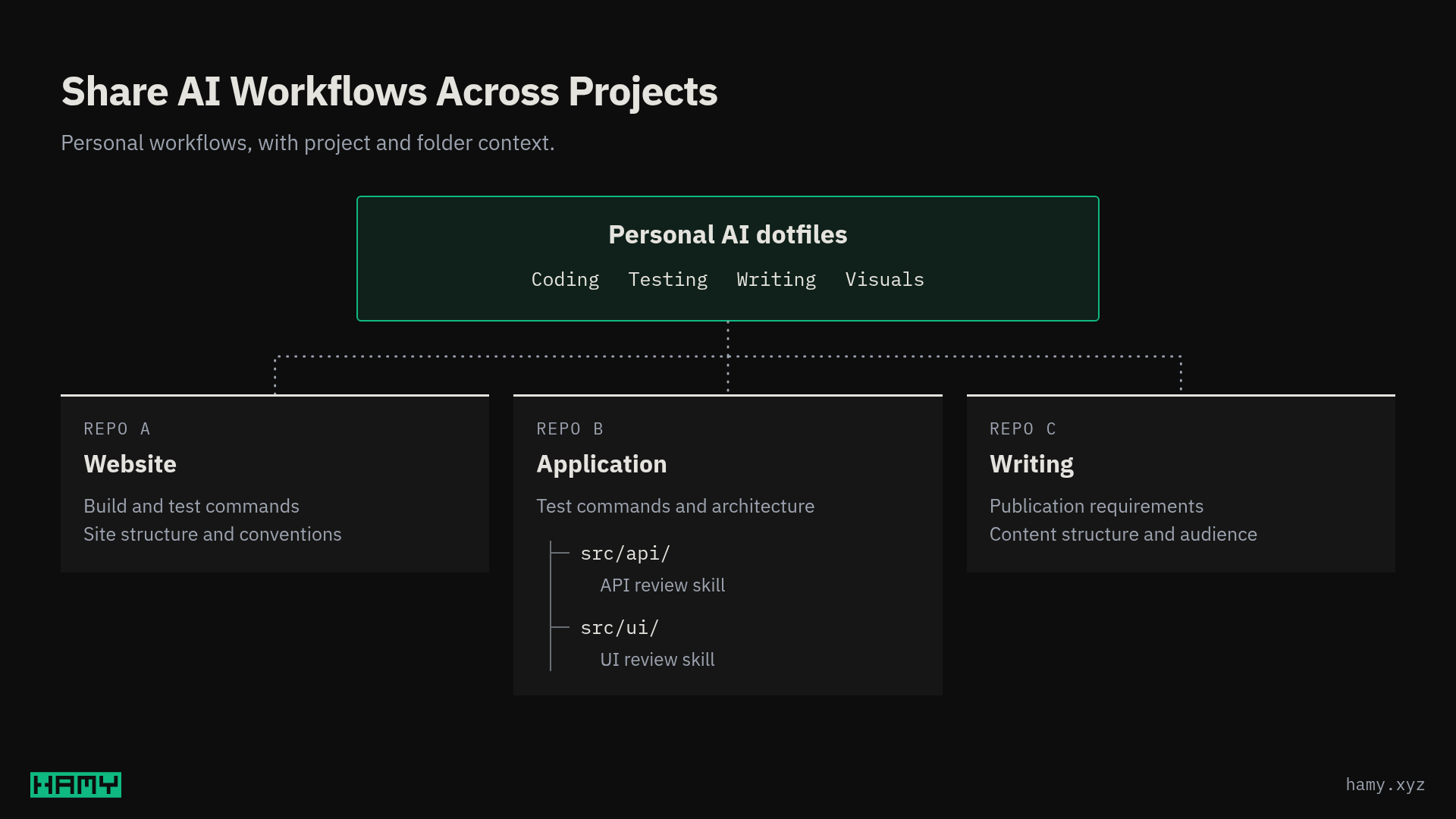
I organize my AI workflows is via hierarchies:
- AI dotfiles - my toolbelt of personal workflows encoding how I like to work
- Project Repo - Project specifics for how this project works and its rules / guidelines
- Project folders - Specifics about this area of the project - code standards, code review guidelines, etc
AI Dotfiles for how you like to work
My AI dotfiles are my personal toolbelt for how I like to work. These are largely subjective and not everyone will agree but this is how I like to approach my avenues of creation.
- My coding workflows - the functionalish style I like, how I think about and like to test, guidelines for specific languages I use (like high-level Rust), how I approach building large features
- My writing workflows - where I want AI to be involved (research and review), where I don't want it to touch anything (my outlines and drafts), where I want suggestions (images, data points)
- My visuals - How I want my diagrams and thumbnails to look, how I want to review them, and the visual style I want to use
These are things generalizable to me across projects I work on and subjective about how I like to work. I wouldn't want to impose them on others and I'm happy to be overridden by project-specific workflows if their guidelines are different but without external rules, this is how I want to work so I encode them as my defaults.
Project AI workflows for how this project works
Project repos are geared more towards what the repos need / do differently than the mainstream.
- How we build and test - the commands, tools, and approaches we want to use
- Architecture + guidelines - is this microservices or moduliths? Do we have naming conventions?
- Business case - What are we trying to build? What features / invariants do our customers expect and we need to keep working?
These are things that the mainstream models will trip up on without guidance. They'll bias towards the mean and use different styles or waste cycles figuring this out from first principles / what's in the codebase.
Giving project direction is how we can scale our direction / standards across the hundreds of agents that will soon take over development of all our projects.
Folder-based AI workflows for local context
These are for targeted context about how certain things work in a given area that an agent may not be able to figure out or would be expensive to do so each session. They only need to read these when working in this area so you're not polluting every agent's context window with them (aka progressive disclosure).
The need for these really depends on the area complexity and size of the project, kinda similar to code comments - it depends on the situation if they're useful or not.
That said, here are some examples of some I've used that are useful in certain situations:
- CODE_REVIEW.md - Encoding rules / gotchas for things to look for when reviewing code in this area
- REQUIREMENTS.md - Explaining the business case / expected behavior of the features in this area. Useful for keeping agents maintaining the business cases, not just the technical cases.
- ARCHITECTURE.md - Explaining the high level view and invariants we expect in our system, again to keep agents on track from inadvertently breaking these
This allows me to explain that extra bit of context that I see agents repeatedly failing at and guard against agents accidentally breaking things that are load-bearing without polluting every agent's context with it if they don't need it.
Next
So this is how I'm bringing my AI workflows with me across machines, projects, and engagements (work and personal). It's not perfect but seems to be working pretty well for now.
If you've got your own setup for sharing AI dotfiles I'd love to see what it looks like!
And if you're curious about what my ai-dotfiles look like, I make them available on the HAMY LABS Example Repo which is available to HAMINIONS Members.
If you liked this post you might also like: